
Blog
Self-hosting for a small business: what it costs and what it saves
Self-hosting means running your business software on servers you own or control, instead of renting it per user per month. For a small business it usually pays off when you have 10 or more staff, use several paid cloud tools, and have someone reliable to look after the servers. Roughly, expect a one-time hardware cost of a few thousand US dollars and savings that show up after one to two years.
We say this as people who run our own servers, firewalls and apps in production. Self-hosting is not free and it is not for everyone. This post shows how to count the real cost.
What does self-hosting actually mean?
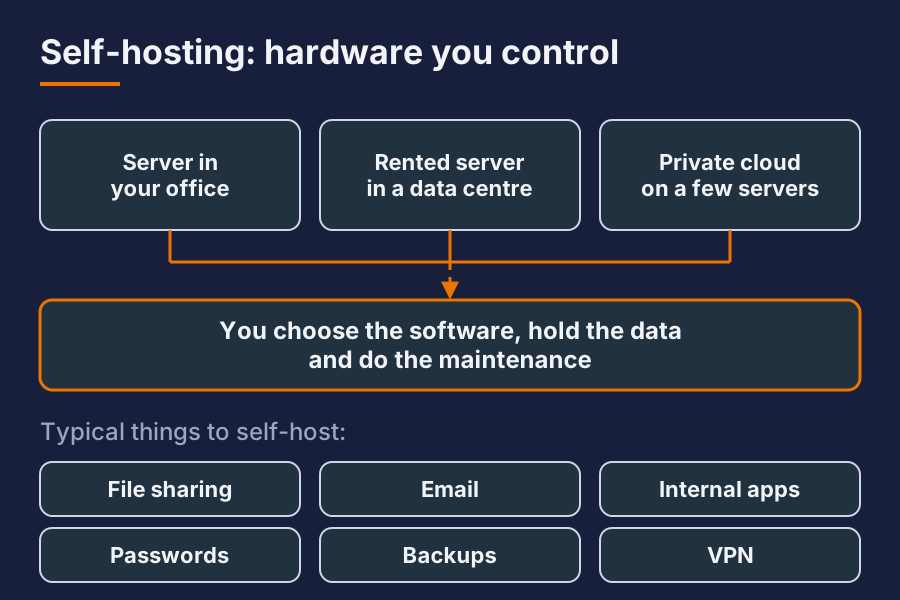
You run the software on hardware you control. That can be a server in your office, a rented server in a data centre, or a private cloud on a few machines. You choose the software, you hold the data, and you do the maintenance.
Typical things small businesses self-host:
- File sharing and sync
- Email gateway or full mail
- Internal web apps and databases
- Password manager
- Monitoring and backups
- A VPN for remote staff
You do not have to host everything. Most sensible setups keep some things in the cloud and host the rest.
What does self-hosting cost?
There are four cost lines. Most people only count the first.
| Cost line | Roughly, in USD | Notes |
|---|---|---|
| Hardware | 1,500 to 6,000 one-time | One or two servers, a UPS, switch, storage |
| Software | 0 to 1,000 per year | Most self-hosted software is open source; some want support plans |
| Connectivity and power | Depends on site | Stable power and a decent uplink matter more than speed |
| Admin time | A few hours per month, more at the start | The line people forget |
Prices vary by country and supplier. Treat these as rough orders of magnitude, not a quote.
Admin time is the one that decides whether self-hosting saves money. Updates, backup checks and the occasional fault all take time. If nobody has that time, pay for support. The sum still often works.
What does it save?
The saving comes from replacing per-user subscriptions with a fixed cost.
A rough example. Say a 20-person business pays about 12 US dollars per user per month for a file and collaboration suite, and another 5 per user for a password manager and a few small tools. That is about 340 dollars a month, or just over 4,000 a year. A self-hosted setup replacing most of that has a larger up-front cost and a smaller yearly one. The break-even point lands somewhere between one and two years.
The other savings are harder to put a number on:
- No price rises you did not agree to. Per-user prices go up. Your own server does not.
- Predictable cost. Hiring a new person does not add a subscription.
- Data stays where you put it. Useful if customers, regulators or your own policy care where data lives.
- Fewer surprises when a vendor changes terms or shuts a product down.
When does self-hosting not make sense?
Be honest about this. Stay in the cloud if:
- You have fewer than about five users. The saving is too small.
- Nobody can check backups or apply updates, and you will not pay someone to do it.
- Your power or internet is unreliable and you cannot fix that.
- The software is a commodity you barely notice, such as basic email.
Mixed setups work well. Keep email in the cloud and self-host files, internal apps and backups.
What do you need before you start?
A short checklist:
- A written list of what you pay for today, per user per month.
- A decision on which of those you really want to move.
- Stable power, a UPS, and a place for the hardware that is cool and locked.
- A firewall and a clear network layout. Do this first, not last.
- A backup plan that includes a copy off site. Hosting without backups is a risk, not a saving.
- A named person who owns updates and monitoring.
If you cannot tick items 3 to 6, fix those before moving anything.
How do you keep it secure and running?
Self-hosting moves responsibility to you. The basics cover most of it:
- Keep the firewall rules short and written down.
- Expose as little to the internet as possible. Put admin pages behind a VPN.
- Patch on a schedule, not when you remember.
- Test restores, not only backups.
- Monitor disk space, backups and certificates, and get alerted by message when something breaks.
We run our own servers and firewalls this way, and the habits are the same at any size.
Can you move one thing at a time?
Yes, and you should. Pick one service with a clear cost, such as file sharing. Move it, run it for a month, and check the real admin time against your estimate. Then decide on the next one. Keep the old subscription until you trust the new setup.
Short answer
Is self-hosting cheaper for a small business? Often, once you have around 10 users and several paid tools. Count hardware, backups and admin time, not only the subscription you are replacing.
How long until it pays back? Roughly one to two years for a typical office setup. Fewer users or more admin time stretches that.
Do we need our own IT person? Not full time. You need someone who owns updates and backup checks, whether that is a staff member or a support contract.
Want this set up for your business? Ask for a quote.