
Blog
Should a small business run its own email server?

A small business can run its own email server, and it can work well. You need a server with a clean public IP address, correct DNS records (SPF, DKIM and DMARC), spam filtering, protection against password guessing, and tested backups. In return you get control of your mail and a cost that does not grow per user. If nobody will look after the server, a hosted service is the better choice.
We run our own mail server in production for our own domains. This post is what we have learned from that, not from a brochure.
What does “hosting your own email” mean?
Your mail lives on a server you control, not in a large provider’s cloud. The server sends and receives mail for your domain, stores the mailboxes, and lets staff read mail in a phone app, a desktop app or a web browser.
A modern mail server is not one program. It is a small set of parts that work together:
- A mail transfer agent that sends and receives mail between servers.
- A mailbox server that stores mail and lets phones and laptops read it (IMAP).
- A spam filter that scores each incoming message.
- A virus scanner for attachments.
- Webmail, with calendars and contacts that sync to phones.
Open-source bundles such as mailcow put all of these parts in containers, with one admin page to add domains and mailboxes. That is what we use.
Why would a business host its own mail?
There are four honest reasons.
- Control of data. You decide where mail is stored and how long it is kept. This matters for client confidentiality and for rules about where data may sit.
- Predictable cost. You pay for a server and for someone’s time, not per mailbox per month. Adding a mailbox for a new staff member costs nothing extra.
- No surprise changes. Prices, features and terms do not change under you.
- Many domains, one server. One server can carry mail for several businesses or brands. We run several domains on one server.
The honest counterpoint: email is the most attacked service a business has. You now own delivery, uptime, backups and security. A hosted service does that for you.
How do you make sure your mail is delivered?
This is the part most people get wrong. Large mail providers do not trust a new server. They check three DNS records before they accept your mail:
| Record | What it says | What happens if it is missing |
|---|---|---|
| SPF | Which servers may send mail for your domain | Your mail looks forged and goes to spam |
| DKIM | A signature on every message, checked with a public key in DNS | Providers cannot prove the mail is really yours |
| DMARC | What to do with mail that fails SPF or DKIM, and where to send reports | Anyone can send mail in your name |
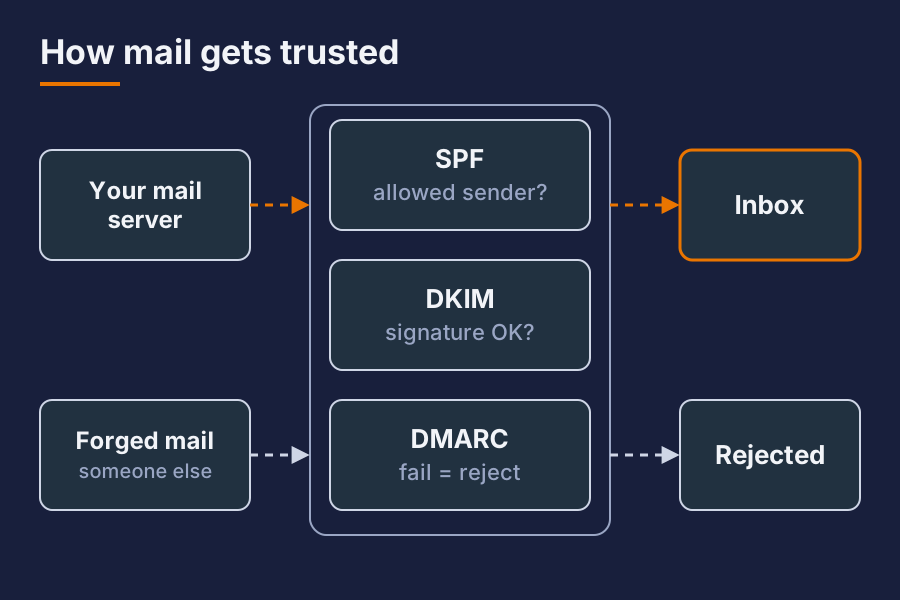
Set all three, and set DMARC to reject once you are sure your own mail passes. Our domains use a strict SPF record and a DMARC policy of reject, so mail that pretends to be from us is refused.
Two more things matter:
- A clean IP address. Your server’s public address must not be on a block list. Many home and office internet connections are not allowed to send mail at all. Check with your provider first.
- Reverse DNS. The IP address must point back to your mail server’s name. Your internet provider sets this.
Then test. Free tools such as mail-tester score a test message out of 10. Our last test on 9 October 2026 scored 10 out of 10. Test again after every change.
How do you keep spam and attackers out?
A mail server must be reachable from the whole world, so you cannot simply block countries. Within hours of going live, automated tools start to guess passwords on it.
What works for us:
- A spam filter that learns. We use rspamd. It scores each message, and when staff move a message to Junk, it learns from that.
- A virus scanner on every attachment.
- Ban after a few failed logins. The server blocks an address after five failed logins, and the ban gets longer each time the address comes back.
- Shared block lists. We run CrowdSec, which reads the mail logs, spots attacks and shares the attacker addresses with a community. Our firewall then drops those addresses before they reach the mail server.
- Strong passwords and app passwords. Each phone or mail app gets its own password, which you can remove without changing the main one.

What about backups?
Mail is often the only record of an agreement, an order or a complaint. Losing it hurts.
Follow the 3-2-1 rule: three copies, on two different kinds of storage, one away from the server. We take a snapshot of the whole mail server every night and keep backups on a separate backup server. A snapshot lets you roll back a bad update in minutes.
Test a restore. A backup you have never restored is a hope, not a backup.
What does it cost to run?
Less than you might think in money, more than you might think in attention.
- Hardware: a small virtual server is enough for a small business. Ours uses 8 GB of memory and a fraction of one disk.
- Software: the open-source parts cost nothing.
- Time: updates once a month, a look at the logs and the block lists every week, and someone who can answer when mail stops.
The time is the real cost. If nobody on your team will do it, pay a partner to run it, or choose a hosted service.
When is a hosted service the better choice?
Choose a hosted service if:
- Nobody will look after the server every month.
- Your internet connection cannot send mail or has no fixed IP address.
- You need features such as large shared mailboxes with legal hold, and your team already uses a big office suite.
Self-hosting suits a business that wants ownership of its mail, runs other servers already, or carries mail for several domains.
Short answer
Can a small business run its own mail server? Yes, with a clean IP address, SPF, DKIM and DMARC set correctly, a spam filter, login protection and tested backups.
Will my mail go to spam? Not if the DNS records are correct and the IP address is clean. Test with a free tool before you move staff over.
Is self-hosted email safe? It is as safe as the care it gets. Monthly updates, banned attackers and tested backups are what make it safe.
Want your business mail set up and looked after? Ask for a quote.