
Blog
Backups that work: the 3-2-1 rule on a small budget
The 3-2-1 rule says keep three copies of your data, on two different kinds of storage, with one copy off site. It protects you from disk failure, accidents, ransomware and fire. A small business can meet it for a few hundred US dollars of hardware plus a low monthly storage fee. The part people skip is testing a restore, and that is the part that matters.
We run our own servers, so we run our own backups. What follows is how we think about them.
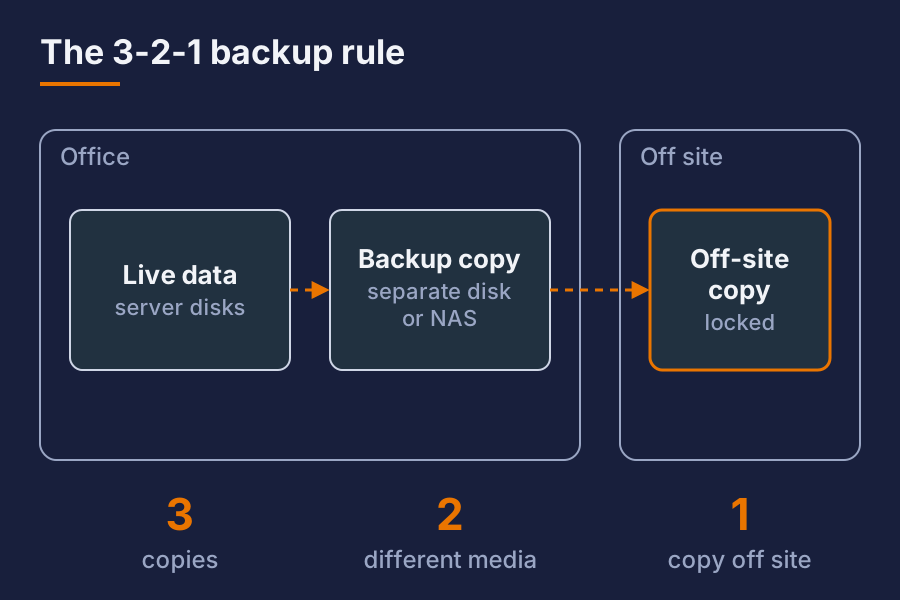
What is the 3-2-1 backup rule?
- 3 copies of your data: the live data plus two backups.
- 2 different media: for example the server’s disks plus a separate backup disk or network storage. Two copies on the same disk array are not two media.
- 1 copy off site: somewhere a fire, flood or theft at your office cannot reach.
Many people now add a fourth idea: one copy that cannot be changed or deleted from the network. That protects against ransomware, which tries to encrypt your backups too.
Why do backups fail when you need them?
In our experience the reasons are boring:
- Backups were never tested, and the restore does not work.
- The backup job stopped months ago and nobody noticed.
- The backup disk sits next to the server and burns with it.
- The backup is connected all the time, so ransomware encrypts it.
- Nobody knows the encryption password.
- It backs up the files but not the database or configuration.
A backup is only a backup if you have restored from it recently.
What should you back up?
Make a list. For a small office, it usually covers:
| Item | Why |
|---|---|
| File shares and documents | The obvious one |
| Databases | Dump them properly, do not copy live files |
| Server and firewall configuration | Rebuilding without it takes days |
| Email, if you host it | Or confirm your provider backs it up |
| Password manager data | People forget this one |
| Laptops of key staff | Or make sure their work lives on a server |
Software you can reinstall is lower priority. Data and configuration you cannot recreate come first.
How can you do 3-2-1 on a small budget?
Here is a pattern that works for a small office. Prices are rough and in USD.
- Copy one: the live data on your server or storage box.
- Copy two: a local backup to a separate machine or external disk array. Roughly 200 to 600 dollars for a decent drive and enclosure.
- Copy three: an off-site backup to a cloud storage bucket or a second site. Usually a few dollars per terabyte per month.
Use backup software that does encryption, deduplication and versioning. Several good open-source tools exist. Encryption matters most for the off-site copy. You send data to a place you do not control, so it must be unreadable to anyone else.
Run backups nightly. Keep daily versions for a couple of weeks, weekly ones for a few months, and monthly ones for longer. Versioning lets you recover a file someone deleted or damaged last week.
How do you protect backups from ransomware?
Ransomware often looks for backups and destroys them first. Defences:
- Pull, do not push. Let the backup machine fetch data from the server, instead of the server having write access to the backups.
- Use a separate login for the backup system, not your normal admin account.
- Keep one copy offline or immutable. A rotated external disk works. So does object storage with deletion locks.
- Turn on versions. An encrypted file becomes a new version, and the old one is still there.
None of this is expensive. It is a matter of setting it up on purpose.
How often should you test a restore?
Quarterly for a small business, and after any big change. A real test means:
- Pick a random file, a database, and one server configuration.
- Restore them to a different place, not over the live data.
- Open them and check they are complete.
- Time it, and write down the steps.
Once a year, go further. Pretend the server is gone and rebuild it from backups on spare hardware or a virtual machine. You will find gaps. That is the reason to do it.
Who should get alerts?
Backups that fail silently are the common disaster. Set up a message when a backup job fails and a weekly note when it succeeds. If the weekly note stops arriving, treat that as a failure too.
Name one person who owns this. If everyone owns it, nobody checks.
Backup checklist
- List of what is backed up, and what is not, written down
- Three copies, two media, one off site
- Off-site copy encrypted, and the key stored safely away from the server
- One copy offline or locked against deletion
- Nightly job with failure alerts
- Restore test done in the last three months
- Restore steps written so someone else can follow them
Short answer
Is cloud storage alone a backup? Not by itself. A synced folder copies deletions and ransomware damage too. You need versioning and a separate backup, ideally with one copy that cannot be changed.
How much does a small business backup cost? Roughly a few hundred US dollars for local hardware, and a few dollars a month per terabyte for off-site storage. Your time to set up and test is the larger cost.
How often should backups run? Nightly for most offices. If losing a day of work is too much, run databases and key shares more often.
Want this set up for your business? Ask for a quote.